SEO & Content Marketing
How to Rank in Google Map Pack: The Local SEO Blueprint for Small Businesses
Every time someone searches “plumber near me” or “HVAC in [your city],” Google shows a map with three businesses at the top. That’s the Google Map Pack — and if you’re not in it, you’re invisible.
This post shows you exactly how to get into those top 3 spots — step by step — so your phone rings first when locals need what you offer.
What Is the Google Map Pack?
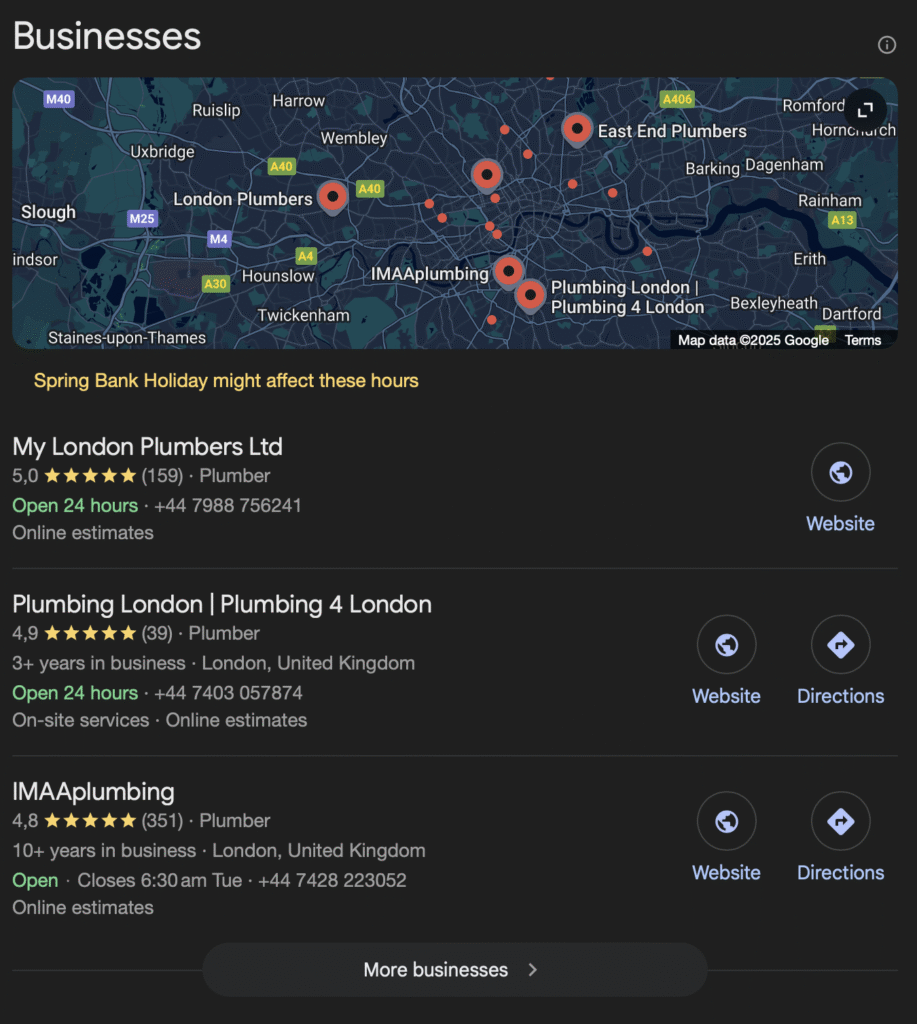
The Google Map Pack — also known as the Local 3-Pack — is a set of three business listings that appear near the top of the search results whenever someone makes a local search on Google. It’s displayed alongside a small map and includes key business details like:
- Business name
- Star rating and number of reviews
- Business category (e.g. “HVAC contractor”)
- Address or service area
- Business hours
- A link to the website and directions
For example, if someone in Birmingham searches for “air conditioning repair near me” or “boiler servicing Birmingham”, they’ll likely see a box at the top of the page featuring three local HVAC companies — that’s the Google Map Pack in action.
Why it matters
The Map Pack isn’t just a nice-to-have. It’s prime real estate.
- It appears above the standard organic results in most local searches
- It’s visually distinct, catching the eye quickly
- On mobile, it often takes up the entire screen — making it the first thing users see
- It allows users to take instant action (call, get directions, read reviews)
What powers the Map Pack?
The listings in the Google Map Pack are pulled directly from Google Business Profiles (formerly Google My Business). That means if your business doesn’t have an optimized profile — or if it’s not seen as trustworthy and relevant — you’re not likely to show up.
Google uses a separate set of ranking factors for the Map Pack compared to regular search results, which we’ll cover shortly. But the bottom line is this:
If you run a local business and want more leads, ranking in the Map Pack is one of the most powerful things you can do.
Next, let’s look at why ranking there is so important — and what kind of traffic and visibility it can actually generate.
Why Ranking in the Map Pack Is Crucial
If you run a local business, ranking in the Google Map Pack isn’t just a nice visibility boost — it’s one of the most powerful things you can do to drive leads, phone calls, and foot traffic.
1. The Map Pack Gets the Majority of Local Clicks
According to multiple studies, over 40% of local search clicks go to the Map Pack — often before users even scroll to the organic results. That means if you’re not in the top 3, you’re likely missing out on nearly half of the potential traffic for your most valuable keywords.
People are also more likely to trust and choose businesses that show up in the Map Pack because:
- It feels “endorsed” by Google
- It shows star ratings and reviews upfront
- It makes it easy to take action (call, navigate, or visit your website)
2. It’s Optimized for Mobile
More than half of local searches happen on mobile devices — and on a phone screen, the Map Pack typically takes up 100% of the view before you scroll.
If someone is searching for “boiler repair near me” from their phone, the chances are high they’ll pick one of the three businesses shown in the Map Pack without ever scrolling further.
3. It Connects You to Ready-to-Buy Customers
The people who see the Map Pack are usually at the bottom of the funnel — they’re not just browsing; they’re ready to hire or contact someone right now.
Whether it’s an emergency HVAC call-out or a scheduled AC installation, local intent = purchase intent. Showing up in the Map Pack puts your business in front of the most qualified leads.
4. It’s Free — but Competitive
Unlike Google Ads, ranking in the Map Pack doesn’t cost money. But it does take strategy and consistency.
Google’s algorithm uses a mix of:
- Relevance (how closely your listing matches the search)
- Distance (how close you are to the searcher)
- Prominence (reviews, reputation, backlinks, and citations)
The good news? You can influence all three with the right steps — which we’ll walk through next.
Up next: How to rank in the Google Map Pack — a step-by-step playbook to help your business break into the top 3.
The 3 Core Ranking Factors for the Google Map Pack
Google doesn’t publicly disclose the full algorithm behind Map Pack rankings, but they’ve made it clear that three core factors drive which local businesses show up:
1. Relevance
How well does your Google Business Profile match what someone is searching for?
Google uses the content in your profile — categories, services, business description, and posts — to determine if your business is a good match for a specific query. If someone searches “AC installation Bristol” and your profile clearly lists that service and location, your chances of showing up improve dramatically.
How to improve relevance:
- Choose the most accurate primary category (e.g., “HVAC contractor”)
- List all your services in detail — don’t skip the “services” section
- Write a complete business description using keywords naturally
- Publish regular GBP posts to help Google understand your offerings
2. Distance
How close is your business to the person making the search?
Google uses the searcher’s location (especially on mobile) to show nearby results. Even if your profile is perfect, you may not show up if you’re too far from the searcher. That said, you can influence perceived coverage by optimizing for service areas.
How to improve distance signals:
- Set accurate service areas in your Google Business Profile
- Include city names and local terms on your website (e.g. “Serving Derby, Nottingham, and Leicester”)
- Build pages targeting nearby towns or boroughs if you service multiple areas
3. Prominence
How well-known and reputable is your business — both online and offline?
Prominence is all about trust. Google looks at signals like review count, review quality, backlinks, business citations, and overall brand presence. A business with 150 five-star reviews, mentions on local directories, and consistent NAP (name, address, phone) info across the web will usually outrank one with a half-completed profile and no reviews.
How to boost prominence:
- Get more positive Google reviews — and reply to them
- Ensure your NAP info is consistent across all listings (Yell, Yelp, Checkatrade, etc.)
- Build local backlinks (sponsorships, chamber of commerce, local press)
- Keep your profile updated with new photos, services, and posts
Understanding these three factors — relevance, distance, and prominence — is the foundation of ranking in the Google Map Pack.
In the next section, we’ll show you exactly how to put this into action with a step-by-step strategy to move your business up the local rankings.
How to Rank in Google Map Pack – Step-by-Step
Now that you know what the Map Pack is and how Google decides who gets in, let’s break down exactly what you need to do to get your business ranked there.
This step-by-step strategy focuses on what actually moves the needle for local businesses like HVAC companies, plumbers, electricians, and more.
Step 1: Claim and Fully Optimize Your Google Business Profile
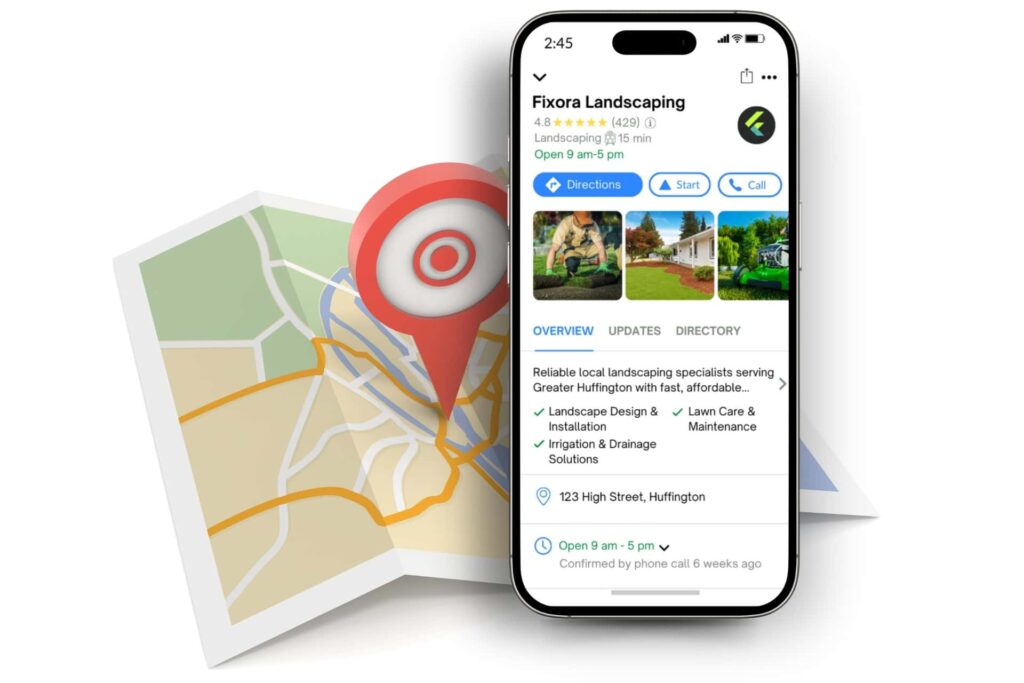
Your Google Business Profile (GBP) is the foundation of Map Pack visibility. If you haven’t claimed yours, start here.
Optimization checklist:
- Use your real business name (no keywords or stuffing)
- Choose the most accurate primary category (e.g. HVAC contractor)
- Add all relevant secondary categories (e.g. air conditioning repair service, boiler supplier)
- Write a keyword-rich but natural business description
- Add all services and include descriptions for each
- Set accurate hours, including holiday hours
- Add high-quality photos regularly (inside, outside, team, vans, equipment)
- Keep your NAP (Name, Address, Phone) consistent with your website and directories
Step 2: Get More (and Better) Reviews
Reviews are a huge trust and ranking signal.
Tips:
- Ask every satisfied customer to leave a review — ideally mentioning the service and location (e.g. “great boiler repair in Sheffield”)
- Respond to all reviews, both positive and negative
- Don’t incentivize or fake reviews — Google is cracking down hard
Step 3: Build Local Citations and Ensure NAP Consistency
Citations are mentions of your business info (NAP) on other websites, directories, and local platforms.
Must-have citations for UK businesses:
- Yell.com
- Thomson Local
- Yelp UK
- Checkatrade
- Trustpilot
- Facebook & Instagram
- Industry-specific sites (e.g., Rated People, MyBuilder)
Must-Have Local Citations for US Businesses:
- Google Business Profile (mandatory)
- Yelp
- Facebook Business Page
- Better Business Bureau (BBB)
- Angi (formerly Angie’s List)
- HomeAdvisor
- Houzz (especially for contractors, remodelers)
- Thumbtack
- Yellowpages.com
- Foursquare
- Chamber of Commerce Local Directory (your city or county)
- Nextdoor (local neighborhood-focused)
- Manta
- Local.com
- Superpages
- Citysearch
- MerchantCircle
- Hotfrog
- Trustpilot (for reputation/review management)
- Industry-specific directories (e.g., PlumbingNet, HVAC.com, etc.)
Pro tip: Use a tool like BrightLocal or Whitespark to build and monitor citations.
Step 4: Optimize Your Website for Local SEO
Google uses your website to help validate your business information and services.
Website essentials:
- Make sure NAP is consistent and crawlable (e.g., in footer and contact page)
- Embed a Google Map with your location pin
- Create dedicated service pages (e.g. “Boiler Repair”, “AC Installation”)
- Create dedicated location pages if you serve multiple cities
- Use local keywords in title tags, meta descriptions, and H1s
- Add LocalBusiness schema markup to your homepage and contact page
Step 5: Build Local Backlinks
Backlinks are still a major Google ranking factor — including for the Map Pack.
Ideas for earning local backlinks:
- Join local chambers of commerce or trade associations
- Sponsor local events or sports teams
- Get listed in local blogs or business roundups
- Offer testimonials to suppliers or partners (they may link back to you)
Step 6: Post Regularly on Google Business Profile
GBP allows you to publish updates, offers, events, and service highlights.
Benefits of regular posts:
- Signals activity and relevance to Google
- Gives potential customers a reason to engage
- Allows you to naturally use local keywords (e.g. “New air conditioning installations now available in Bristol”)
Post once a week minimum — more often if you have promotions or updates.
Step 7: Track Your Results and Improve
Use these tools to measure your visibility and performance:
- Google Business Profile Insights (views, searches, calls, direction requests)
- Google Search Console (keywords, click-through rates)
- Google Analytics (on-site behavior, conversions)
- Rank tracking tools like BrightLocal, Whitespark, or Local Falcon
Watch what’s working and continue improving — especially reviews, photos, content, and links.
Negosense is a full-service digital marketing agency for home services. We handle this entire process, and more, for our clients.
If you want to learn more about how SEO fits into your digital marketing strategy, check out our Ultimate to Digital Marketing for Home Services.
Common Mistakes That Hurt Your Map Pack Rankings
Even if you’re doing many things right, a few overlooked issues can quietly sabotage your chances of ranking in the Google Map Pack. Here are the most common mistakes local businesses make — and how to fix them.
1. Keyword Stuffing Your Business Name
Tempted to rename your listing “Bristol Boiler Repair Experts – Smith Heating Services”? Don’t. Google’s guidelines are clear: your business name should reflect your real-world branding. Keyword stuffing can lead to suspensions or ranking drops — and it looks untrustworthy to users.
Fix: Use your legal business name only. Let your services and content do the keyword work.
2. Inconsistent NAP (Name, Address, Phone Number)
Google wants to trust that your business details are accurate. If your name, address, or phone number differs between your website, Google Business Profile, Yelp, and other directories — that inconsistency can hurt your rankings.
Fix: Audit all your local citations and make sure your NAP info is 100% consistent across every platform.
3. Ignoring the Website
Your Google Business Profile is key — but your website still plays a major role. If it’s outdated, lacks local keywords, or doesn’t clearly support your services and location, you’re weakening your Map Pack chances.
Fix: Make sure your website includes:
- Clear service pages
- Location-specific keywords
- Your full NAP
- Schema markup for local business
4. No Reviews or Unmanaged Reputation
Even a few low-star reviews — especially if left unanswered — can tank your visibility. Google wants to showcase trustworthy businesses, and review signals play a big role.
Fix:
- Actively ask for reviews from happy customers
- Respond to all reviews (positive or negative)
- Report fake or malicious reviews when appropriate
5. Set-and-Forget Profile Management
Google rewards businesses that stay active. If you haven’t touched your profile in months, it sends the wrong signal.
Fix:
- Add photos regularly
- Post weekly updates or offers
- Update service descriptions and business info as needed
Final Tip: Ranking in the Map Pack isn’t a one-time task — it’s a system. The businesses that win are consistent, responsive, and visible across every local touchpoint.
How to Track Your Rankings and Improve Over Time
Getting into the Google Map Pack isn’t a one-time task — it’s an ongoing effort. To stay ahead of competitors (especially in saturated markets like HVAC), you need to track your performance and refine your local SEO regularly.
Here’s how to do it effectively.
1. Track Local Rankings with the Right Tools
Google doesn’t make it easy to see where you rank locally — especially since results can vary based on location, device, and search history. That’s why it’s smart to use tools that specialize in local rank tracking.
Recommended tools:
- BrightLocal – Great for heatmaps, citation tracking, and competitor analysis
- Whitespark – Useful for tracking Google Map Pack performance and managing citations
- Local Falcon – Visual map-based rank tracking based on GPS location
- Google Search Console – Not specific to Map Pack, but helpful for overall visibility
Set up weekly or monthly tracking to monitor:
- Which keywords trigger Map Pack visibility
- How you rank in different areas (postcode or city-level)
- Movement up or down over time
2. Monitor and Respond to Reviews
Reviews are one of the few Map Pack factors you can directly influence on an ongoing basis. Keep a steady flow coming in and engage with them.
Tips:
- Send review requests via email or text after service
- Use a tool like NiceJob or GetMoreReviews to automate requests
- Respond to all reviews — especially negative ones — with professionalism
3. Keep Optimizing Your Profile and Website
The businesses that stay in the Map Pack keep earning it. Here’s how to stay competitive:
- Add new photos regularly (Google loves fresh content)
- Update your GBP posts weekly with offers, tips, or seasonal services
- Revisit and improve your service descriptions every few months
- Keep your website updated with new blog content, FAQs, and service pages
4. Analyze Your Competitors
Keep an eye on who’s ranking above you — and why. Look at:
- Their number of reviews and average rating
- Their primary business category
- What keywords appear in their business title or descriptions
- How often they post updates
Often, just outperforming them on one or two fronts (like reviews or service relevance) can bump you up.
Final Tip: Be Consistent and Patient
Local SEO is a long game. Most businesses won’t rank overnight — but the ones that do the right things consistently win in the long run.
Track your progress, refine your approach, and stay active. The reward? A steady flow of high-intent leads, directly from Google — without paying for ads.
Want help getting ranked in the Google Map Pack? Book a free strategy call, and we will analyze your Google Business Profile and point you in the right direction.