CRM & Job Management
The Ultimate Guide to CRM for Home Services
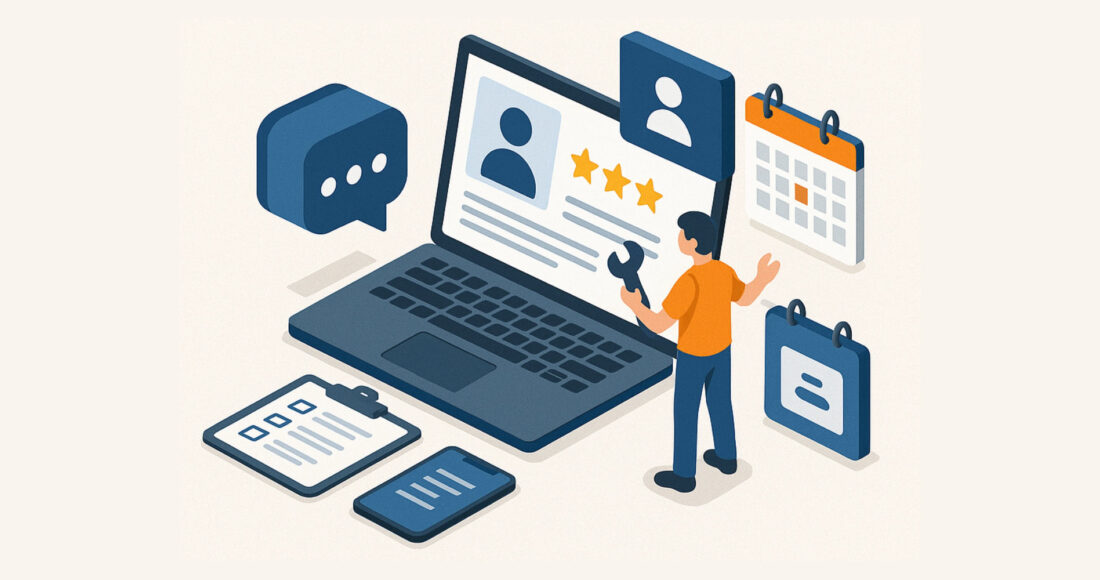
Running a successful home services business—whether you’re a plumber, electrician, roofer, or landscaper—means juggling countless tasks: managing incoming leads, scheduling service calls, maintaining customer data, and ensuring your team stays in sync. But as your business grows, it becomes harder to track everything through spreadsheets, sticky notes, or scattered software tools. That’s where a Customer Relationship Management (CRM) system comes in.
In this comprehensive guide, we’ll walk you through what a CRM for home services is, why it’s an absolute game-changer, and how to choose and implement the right one. We’ll also highlight niche-specific examples so you can see exactly how CRMs transform daily operations across various home services.
Why a CRM for Home Services is Important
Home service businesses live and die by their leads and customer relationships. Missing a call from a frantic homeowner with a burst pipe, or failing to follow up after sending a quote for a new roof, can mean lost revenue and damaged reputation. Here are the top reasons CRMs are a must:
- Missed calls and scattered notes: When you rely on paper notes or multiple spreadsheets, calls can slip through the cracks. A CRM centralizes all information, so leads don’t get lost.
- Speed-to-lead is everything: In emergency-focused niches like plumbing or HVAC, customers often call the first business that picks up. A CRM helps you respond quickly by automating notifications and assigning leads to the right person.
- Streamlined operations: A good CRM helps you automate and organize scheduling, dispatch, customer data, and follow-ups. Less manual admin, more time to focus on delivering great service.
CRM Mobile Access: many businesses rely on accessing their CRM, and need a field service management software for small businesses with mobile access.

What You’ll Learn
By the end of this guide, you’ll understand:
- Crucial CRM for home services features (lead capture, scheduling, dispatch, invoicing, etc.)
- How to choose and implement a CRM system effectively.
- Real-world examples of how different home service niches use CRMs to boost revenue and streamline their workflows.
The difference between a CRM for home services and field management software for small businesses.
What is a CRM? (And Why Home Services Need One)
Defining a CRM
CRM stands for “Customer Relationship Management.” At its simplest, it’s a system that helps you manage interactions with customers and potential leads. Unlike a basic contact database, a full-featured CRM includes tools for lead tracking, communication logs, scheduling, and even financial transactions like quotes and invoices. A home services CRM is basically the same as a field service management software for small businesses.
Common Pain Points CRMs Solve
- Missed leads or slow responses: All inbound inquiries are stored in one place, and automated workflows ensure no lead is left behind.
- Disorganized scheduling: Instead of juggling multiple calendars or spreadsheets, a CRM centralizes appointments and dispatches techs efficiently.
- Limited visibility into the sales pipeline: Track how leads move from initial call to closed deal.
- Unclear marketing ROI: Understand which campaigns bring you the best leads by integrating with your marketing channels.
How CRMs Impact Profitability
- Higher conversion rates: Consistent follow-ups ensure fewer leads go cold.
- Better upselling/cross-selling: Centralized data provides insights into past purchases, allowing targeted offers.
- Reduced admin time: Automate tasks like scheduling, reminders, and invoicing, freeing up your team for higher-value work.
CRM for Home Services: Key Features
1. Lead Capture & Tracking
Your CRM should offer multiple ways to capture leads—web forms, call tracking, chat widgets, and email parsing. Some CRMs even assign leads automatically to specific technicians or sales reps based on location or service type.
Want to learn about lead generation? Check out our guide on Lead Generation for Contractors.
2. Contact Database & Customer Profiles
Easily store and retrieve customer details, job history, and communication logs. Segmentation features let you group customers by service needs, location, or contract types, helping you target them with relevant marketing or upsell offers.
3. Scheduling & Dispatch
One of the biggest headaches in home services is managing appointments and assigning jobs. A robust field service management software or CRM for home services integrates calendars so you can see all appointments at a glance and dispatch the nearest available technician, complete with real-time updates.
4. Quotes, Estimates, & Invoicing
Generating quotes and estimates directly from your CRM streamlines your billing process. Many CRMs even track invoice status, send payment reminders, and integrate with payment gateways.
5. Automation & Reminders
Automated workflows can handle:
- Follow-up on estimates within a set timeframe.
- Appointment confirmations via email or SMS.
- Maintenance reminders for recurring services.
- Internal notifications for pending tasks or overdue invoices.
6. Reporting & Analytics
Dashboards provide a snapshot of:
- Lead sources, conversion rates, and technician performance.
- Cost per lead and ROI for marketing campaigns.
- Lifetime customer value for strategic planning.
7. Integrations
A CRM for home services doesn’t exist in a vacuum. Look for integrations with:
- Accounting software (e.g., QuickBooks).
- Marketing tools (email marketing platforms, PPC campaigns, social media schedulers).
- Phone systems (for call tracking and record-keeping).
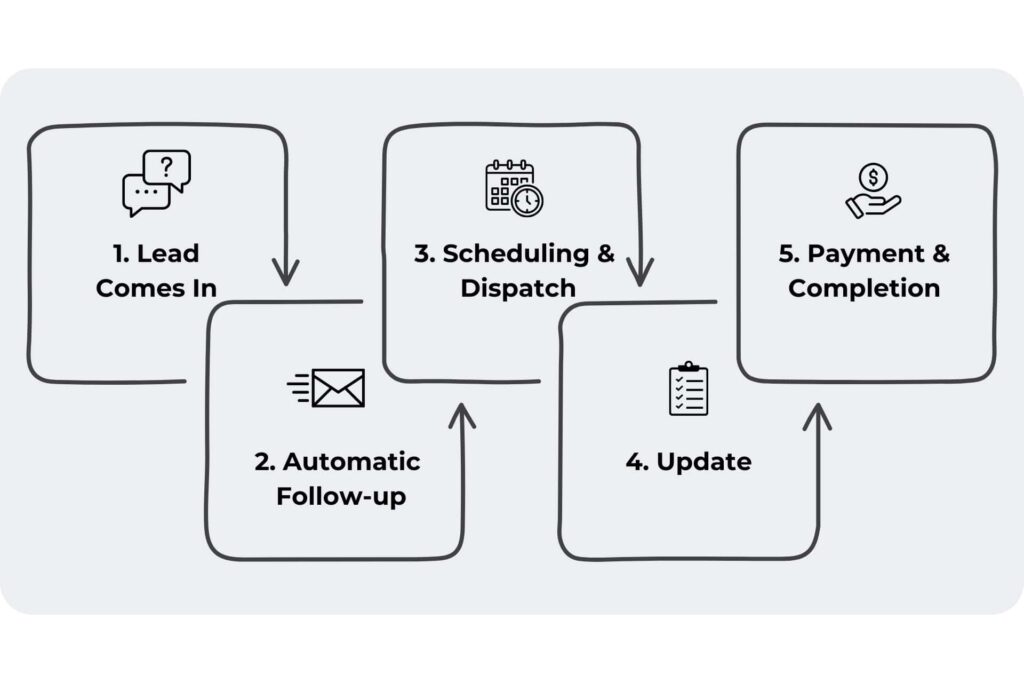
CRM for Home Services vs. Field Service Management Software: What’s the Difference?
A CRM for home services is designed to help businesses attract, manage, and retain customers through lead management, automated follow-ups, marketing campaigns, and online booking. It focuses on customer interactions, ensuring businesses can nurture relationships, improve conversions, and increase repeat business.
In contrast, field service management software for small businesses is built to streamline job scheduling, dispatching, GPS tracking, and technician workflow management—ensuring that field operations run smoothly. It helps businesses assign jobs, track technician locations, and manage invoicing, making service delivery more efficient.
Some software solutions combine both, providing a complete system for customer management and field operations. Popular all-in-one platforms include ServiceTitan, Housecall Pro, and Jobber. However, unlike these, Negosense builds fully customized field service management workflows on top of its CRM, ensuring businesses get a tailored solution that handles both customer relationships and job execution seamlessly—without relying on third-party integrations.
Choosing the Right CRM for Home Services Businesses
Assessing Business Size & Complexity
- Small businesses and solo operators: Might need a lightweight field service management software focusing on lead tracking and basic scheduling.
- Mid-sized teams: Likely require robust dispatching, team collaboration, and invoicing features.
- Large franchises: Need advanced reporting, multi-location scheduling, and possibly franchise-wide data oversight.
Key Considerations
- Dispatching needs: Do you manage multiple service calls simultaneously and require real-time technician location tracking?
- Invoicing & recurring billing: If you handle ongoing or recurring contracts, pick a CRM with strong billing automation.
- Existing tool integrations: If you already have a booking system, phone lines, or specific marketing software, ensure your CRM connects seamlessly.
Best CRMs for Home Service Businesses to Explore
ServiceTitan: Purpose-built for home service businesses, it includes advanced dispatching, job costing, reporting, and integrated payments. Best for larger teams needing deep analytics and high-level automation.
Jobber: A user-friendly CRM with powerful scheduling, invoicing, and client communication tools. It’s great for small to mid-sized service businesses looking for an intuitive, all-in-one solution.
Housecall Pro: A mobile-first CRM that simplifies scheduling, invoicing, and customer interactions. It also includes payment processing, marketing automation, and GPS tracking to help field technicians stay on schedule.
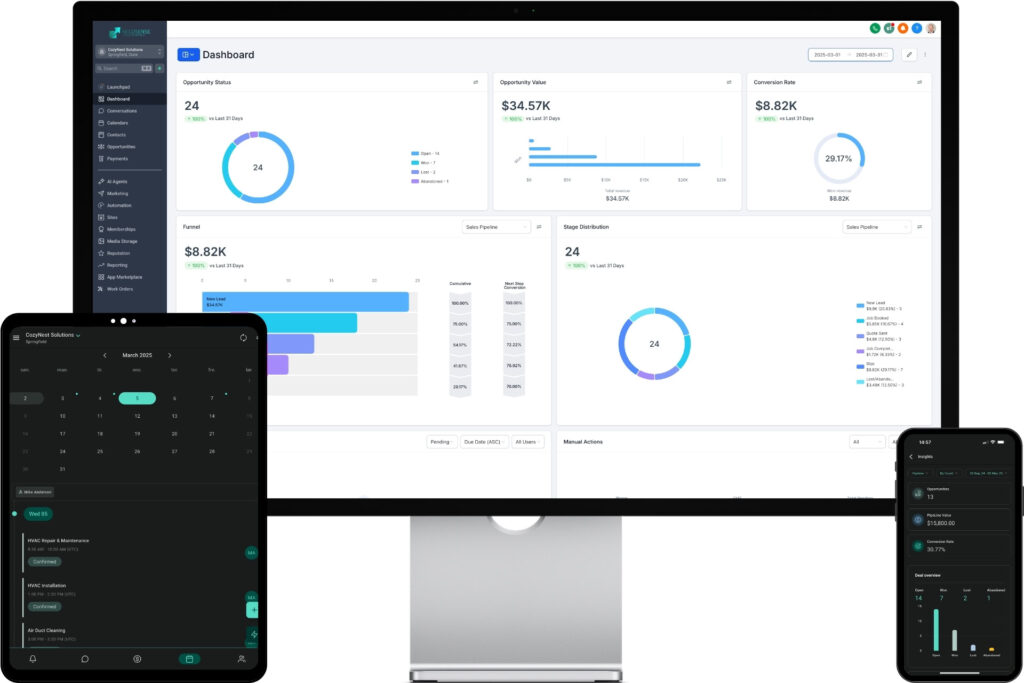
Negosense CRM: A fully done-for-you CRM built specifically for home service businesses. Comes with premium 24/7 live support, a dedicated account manager, and turnkey setup—everything is set up for you. Plus, you get fully custom-built workflows to automate any task you need, so you can focus on growing your business while the system runs on autopilot.
Check out this article for a full breakdown of features in the Negosense CRM.
Demo & Trial Periods
Always take advantage of free trials to test real-world scenarios:
- Import sample data (a few leads, clients, or job records).
- Check ease of use for you and your team.
- Assess crucial metrics: e.g., time to create an invoice, or ability to respond to leads quickly.
Implementing a CRM: Step-by-Step
Whether you’re implementing an enterprise-level CRM for home services, or a field service management software for small businesses, the implementation process is largely the same:
1. Planning & Data Migration
Gather existing customer data from spreadsheets, paper files, or older systems. Clean it up by removing duplicates or outdated info. This ensures your fresh CRM system starts with accurate data.
2. Customization
Tailor fields to your specific needs—service type, job status, equipment details, or property specifications. Set up templates for quotes, SMS notifications, and emails to maintain brand consistency.
3. Team Training
A CRM only works if your whole team uses it consistently. Host a training session for dispatchers, technicians, and sales reps to cover:
- Entering leads and customer data
- Scheduling jobs and updating job statuses
- Generating quotes or invoices
- Recording job notes and after-service feedback
4. Automation & Workflow Setup
Automate repetitive tasks, such as:
- Lead follow-ups if a quote isn’t approved within 48 hours.
- Appointment reminders the day before a scheduled service.
- Maintenance alerts for HVAC or landscaping clients with recurring needs.
5. Launch & Optimization
Deploy the CRM and monitor performance for the first few weeks:
- Gather feedback: Are team members finding it intuitive?
- Fix bottlenecks: Are any workflows too complicated or missing steps?
- Adjust and refine: Continuously tweak automation rules, fields, or notifications.
Niche-Specific CRM Use Cases
While the fundamental challenges are the same (managing leads, scheduling, and follow-ups), each home service niche has unique requirements. Here’s how a CRM for home services businesses can help different niches:
Plumbers & Electricians
- Immediate response to emergency calls: Automate lead routing so urgent calls go straight to the nearest available technician.
- Job history tracking: Store details about parts used or recurring issues, improving follow-up service.
HVAC
- Seasonal tune-ups & maintenance contracts: Schedule reminders and service calls automatically.
- Filter change notifications: Automate SMS reminders to customers every few months, strengthening customer relationships.
Roofers
- Longer sales cycles: Keep track of leads through inspection, multiple quotes, and final contract.
- Insurance integrations & photo documentation: Attach files or photos to customer records for smoother claims.
Landscapers
- Recurring billing for lawn care: Automate monthly invoices and track which clients have seasonal services.
- Managing multiple crews and routes: A CRM with robust dispatching ensures efficient coverage of large geographical areas.
Cleaners (Residential & Commercial)
- High-volume scheduling: CRMs handle daily or weekly recurring tasks without confusion.
- Subscription clients: Set up automated billing and reminders for cleaning appointments.
CRM for Home Services vs. Field Service Management Software for Small Business: Which One Do You Need?
The right software depends on how your business operates.
Choose a CRM for Home Services if:
- You need customer relationship management to track leads and nurture clients.
- You want automated follow-ups, marketing campaigns, and online booking.
- Your focus is on lead generation, customer retention, and business growth.
Choose Field Service Management Software for Small Business if:
- You rely on job scheduling, dispatching, and GPS tracking.
- Your team needs a system for managing work orders, technician assignments, and invoices.
- You require automated invoicing and real-time job tracking.
Choose an All-in-One Solution if:
- You need the best CRM for home services businesses with built-in job management.
- Your business depends on both customer relationship management and field service automation.
- You want a fully customized system instead of juggling multiple software platforms.
Unlike traditional platforms, Negosense builds custom field service management workflows on top of its CRM for home services, ensuring businesses get a seamless, all-in-one solution without relying on third-party integrations.
Overcoming Common CRM Challenges
1. Team Adoption
New software can intimidate staff. Overcome resistance by:
- Demonstrating efficiency gains: Show how much time they’ll save on manual tasks.
- Providing incentives: Recognize top CRM users, or tie usage to performance metrics.
- Offering continuous training: Maintain a knowledge base or hold refresher sessions.
2. Data Accuracy & Consistency
- Set standards: Decide on required fields, naming conventions, and note-taking guidelines.
- Audit regularly: Periodically check for incomplete data or duplicates.
3. Integration Hiccups
If your phone system or older software doesn’t play nice with the CRM:
- Consult vendor support: Many CRM companies offer specialized onboarding or API support.
- Consider third-party tools or plugins: They can serve as bridges between systems.
4. Security & Privacy
- Encryption and permissions: Make sure sensitive data (like credit card info) is stored securely.
- User access levels: Limit who can view or edit sensitive information.
- Compliance: If you collect personal data, understand relevant privacy regulations.
Measuring Success & ROI with a CRM for Home Services
Key Performance Indicators (KPIs)
- Lead response time: How quickly you respond to new leads.
- Conversion rate: The percentage of leads that become paying customers.
- Average job value: Track how CRM-driven upsells or cross-sells affect revenue.
- Lifetime customer value: Measure the total revenue a customer brings over time.
Tracking ROI on Marketing Channels
When your home service CRM or field service management software integrates with your advertising platforms or website analytics, you can see exactly which marketing sources (e.g., Google Ads, social media, local flyers) deliver the best ROI.
Continuous Improvement
Use monthly or quarterly CRM performance reviews to:
- Identify bottlenecks in lead handling or scheduling.
- Adjust or create new automation workflows.
- Refine your marketing spend based on data insights.
Case Studies & Success Stories
In this section we will look at how a CRM for home services can benefit different niches.
Plumber Improves Response Time
- Before CRM: The plumber missed calls during peak hours, leading to a steady drop in revenue.
- After CRM: With automated lead capture and immediate notifications, response times improved by 50%. This led to a 30% increase in closed jobs.
HVAC Business Automates Seasonal Tune-Ups
- Challenge: Technicians had to manually track when each client’s maintenance was due.
- Solution: Automated email and SMS reminders, plus a streamlined scheduling process.
- Results: Contract renewals rose by 25%, and the business saw a higher total booking rate year over year.
Roofing Contractor Manages Big Projects
- Pain Point: Projects involved multiple quotes, insurance documentation, and status updates.
- CRM Impact: Centralized records replaced chaotic spreadsheets, and the average lead-to-close timeline dropped by 20%.
Key Takeaways
A CRM is no longer optional for home service businesses aiming to scale effectively:
- It centralizes your leads, customer data, and job schedules.
- It automates routine tasks like follow-ups and reminders.
- It provides data-driven insights to optimize your marketing and operations.
CRM for Home Services: The 4C Growth Engine
The 4C Growth Engine is how we turn your service business into a lead-converting, reputation-building machine.
It starts with Clickability — a fast, mobile-optimized website designed to attract clicks and turn searchers into visitors.
Then comes Credibility, with trust-building design, reviews, and messaging that make you the obvious choice.
Next is Convertibility — our CRM and automation stack that captures leads, follows up instantly, and closes more jobs.
Finally, Consistency — field ops automation, monthly lead gen, and reporting dashboards that keep growth steady and predictable. It’s everything you need to scale, built into one engine.
Get a free CRM readiness assessment: Our team can help you evaluate options and plan your CRM implementation. Book a free consultation.
FAQ: Choosing the Right CRM for Home Services
1. How do I know if my business is ready for a CRM?
If you’re missing calls, losing track of leads, or juggling too many tools, it’s time. A CRM helps centralize your data, automate follow-ups, and scale operations without added chaos.
2. What’s the difference between a CRM and field service management software?
CRMs focus on lead management and customer communication. Field service tools handle job scheduling and dispatch. The best systems (like Negosense) combine both for a complete solution.
3. How long does it take to implement a CRM?
It depends on complexity, but most small businesses can be up and running in 7–14 days. Planning, data migration, training, and automation setup are the key steps.
4. What features should I look for in a CRM for my industry?
Look for lead tracking, online booking, automated follow-ups, invoicing, dispatch, and mobile access. If you’re in plumbing, HVAC, or landscaping, niche-specific workflows can make a huge difference.
5. Do I need technical skills to use a CRM like this?
Not at all. Many modern CRMs for home services — especially ones like Negosense — are built for non-technical business owners. We also offer full setup and training so you don’t have to figure it out alone.
Articles Related to CRM for Home Services
- The Ultimate Guide to Digital Marketing for Home Services
- SEO for Home Services in 2025
- How Content Marketing Can Help Grow Your Home Service Business in 2025
- Home Services Advertising in 2025: Proven Strategies to Outperform Your Competition
- Unlock More Jobs with Smart Email Marketing
- The Smarter Way to Win at Home Service Lead Generation