AI & Automation
AI Agents for Home Service Businesses: How to Automate Smarter and Scale Faster
Introduction
AI agents aren’t just a futuristic idea—they’re a practical tool already reshaping how home service businesses operate. From HVAC and plumbing to roofing and cleaning services, companies are using intelligent agents to answer phones, book jobs, and follow up with leads automatically. But unlike basic chatbots or traditional automations, AI agents are capable of reasoning, planning, and executing tasks with minimal oversight.
In this post, we’ll break down what AI agents are, how they work, and where they deliver the most value in a home service business. We’ll also walk through the best platforms to use, how to integrate agents with your CRM, and what data and workflows you need to get started. Finally, we’ll explain where AI agents fit in the broader AI adoption journey—so you know when and how to deploy them effectively.
What Are AI Agents?
AI agents are autonomous software systems designed to perform tasks, make decisions, and interact with digital environments on your behalf. They’re not just rule-based automations or command-driven assistants—they’re goal-driven systems that can break down complex problems, adapt over time, and carry out multi-step workflows with little to no human input (IBM, NVIDIA).
Key characteristics of AI agents include:
- Autonomous task execution
- Ability to reason and plan toward a goal
- Memory and contextual awareness
- Integration with tools, APIs, and databases
- Adaptation based on feedback and outcomes (AWS, BCG)
There are multiple types of agents, ranging from simple reflex agents that react to inputs, to learning agents that evolve over time based on data and experience. More advanced systems can include multi-agent architectures where several agents collaborate to accomplish tasks—like coordinating technician schedules or optimizing dispatch routes (NVIDIA).
To understand how AI agents differ from AI assistants, here’s a quick comparison:
| Feature | AI Assistants | AI Agents |
| Purpose | Simplify tasks via commands | Solve complex, goal-driven tasks autonomously |
| Task Complexity | Low to moderate | Moderate to high |
| Interactivity | Reactive | Proactive |
| Autonomy | Low (needs step-by-step guidance) | High (plans and executes independently) |
| Learning Ability | Minimal | Significant, adapts over time |
| Integration Range | Limited to specific tools or commands | Broad (uses APIs, tools, databases, LLMs) |
In short, AI agents represent a significant leap forward from basic automations. They allow home service businesses to operate with more intelligence, scalability, and resilience—without needing to hire more staff.
Best Use Cases for AI Agents in Home Service Businesses
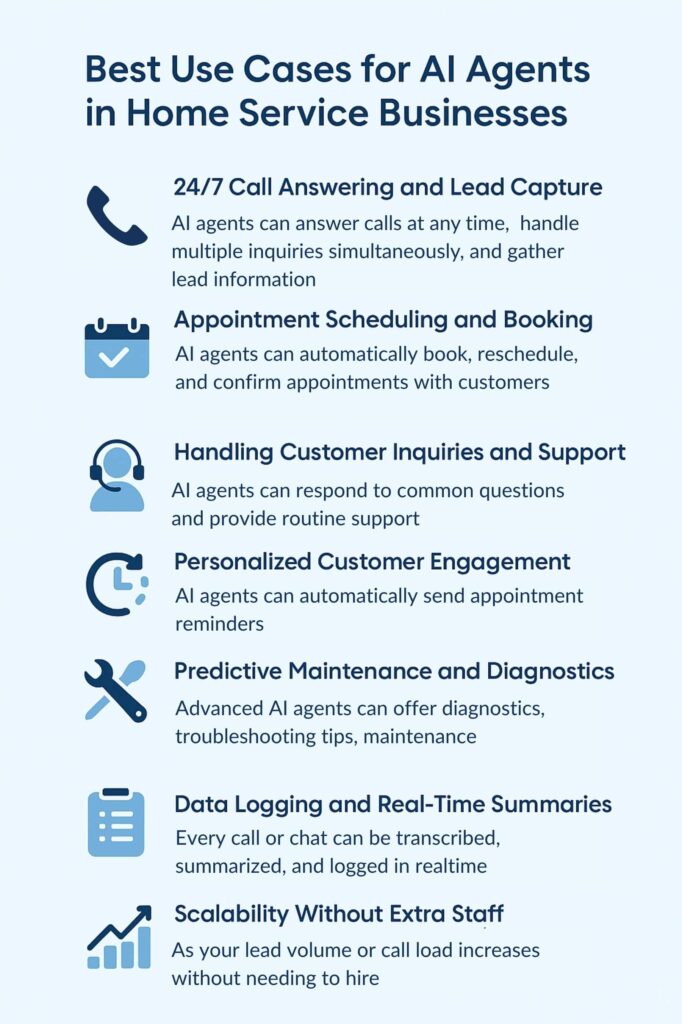
Home service businesses rely on fast communication, efficient scheduling, and excellent customer support. These are exactly the kinds of repetitive, time-sensitive workflows where AI agents excel. When deployed strategically, agents can save time, reduce human error, and improve customer satisfaction—all while helping businesses scale without growing headcount.
Here are the most impactful ways AI agents can be used in a home service context:
24/7 Call Answering and Lead Capture
AI agents can answer calls at any time, handle multiple inquiries simultaneously, and gather lead information without putting customers on hold. This ensures every call is answered—no matter when it comes in—maximizing lead capture during evenings, weekends, and peak hours (ServiceAgent, Nexa).
Appointment Scheduling and Booking
Agents can automatically book, reschedule, and confirm appointments with customers. They integrate with calendars or CRM systems, reducing back-and-forth communication and streamlining team schedules (XAPP AI, Dasha).
Handling Customer Inquiries and Support
AI agents can respond to common questions about pricing, availability, service areas, and more. For routine support issues, they can troubleshoot or escalate to a human rep when needed—providing fast, consistent service without overwhelming your team (Retell AI).
Personalized Customer Engagement
By using business-specific context and previous customer data, AI agents can personalize conversations and suggestions. This helps build stronger relationships and makes interactions feel more human and helpful (Nexa).
Workflow Automation and Reminders
Agents can automatically send appointment reminders, post-service follow-ups, review requests, and maintenance alerts. These proactive touchpoints reduce no-shows and keep customers engaged with your business (Dasha).
Predictive Maintenance and Diagnostics
Advanced AI agents can offer basic diagnostics, troubleshooting tips, or even maintenance recommendations based on customer input or historical patterns—providing value before a technician even arrives (Dasha).
Data Logging and Real-Time Summaries
Every call or chat can be transcribed, summarized, and logged in real time. This supports better follow-ups and gives your team immediate visibility into what was discussed without having to listen to recordings (ServiceAgent).
Scalability Without Extra Staff
Perhaps the most strategic benefit: as your lead volume or call load increases, AI agents scale with you. There’s no need to expand your admin team or hire additional receptionists, which keeps your costs lean while maintaining high-quality service (Nexa).
Summary of tasks and benefits:
| Task | Benefit |
| 24/7 Call Answering | Never miss a lead, instant response |
| Appointment Scheduling | Automated bookings, reduced admin work |
| Customer Inquiries | Faster support, consistent answers |
| Personalized Engagement | More relevant communication, better experience |
| Workflow Reminders | Fewer no-shows, improved follow-up |
| Predictive Diagnostics | Adds value, improves first-time fix rates |
| Data Logging | Supports decision-making and accountability |
| Scalability | Handle growth without additional staff |
Platforms to Build AI Agents for Home Service Businesses
There are now several AI platforms built specifically—or customizable—for service businesses that want to deploy intelligent agents. These tools handle everything from inbound calls and scheduling to lead qualification and CRM integration. The best choice depends on your tech stack, budget, and how deep you want to go with automation.
Here are the leading options:
ServiceAgent
Built exclusively for home service businesses like HVAC, plumbing, and roofing, ServiceAgent automates inbound call handling, appointment booking, and real-time call summaries. It’s trained on thousands of industry-specific calls, which helps it sound natural and handle objections effectively. It also integrates easily with calendars and CRMs, making it a strong plug-and-play solution for small teams
serviceagent.ai
Retell AI
Retell offers AI phone agents that act as 24/7 virtual receptionists. They handle repair requests, emergency dispatching, and scheduling. What makes Retell stand out is its integrations with tools like ServiceTitan, Housecall Pro, Jobber, and Zendesk, making it easy to fold into existing service workflows
retellai.com
Regal
Used by brands like Angi and Kohler, Regal’s AI agent platform handles both inbound and outbound calls. It automates lead qualification, appointment setting, confirmations, and follow-ups. With centralized data access and a focus on lifecycle marketing, Regal helps companies reduce churn and increase conversion
regal.ai
XAPP AI
XAPP offers self-service AI agents that can answer questions, capture leads, and schedule jobs. Setup can take as little as five minutes, and the platform includes built-in integrations designed specifically for home service companies
xapp.ai
Avoca
While not an agent in itself, Avoca offers automated QA and call grading. It classifies and analyzes every call or interaction to uncover service trends, track rep performance, and improve customer service
getavoca.ai
General AI Agent Platforms
For businesses that want full control, general-purpose agent platforms like Relay.app, Gumloop, Stack AI, Voiceflow, and OpenAI’s Operator can be customized to serve home service workflows. These tools are ideal for tech-savvy teams or those working with an AI consultant to build custom agents from scratch
Relay, Stack AI, Voiceflow
n8n as a Backend Orchestrator
n8n isn’t an AI agent platform on its own—but it can act as the backend engine behind one. You can use n8n to receive inputs from your AI agent, trigger complex workflows, update CRM records, send Slack alerts, or route requests to human staff. It’s ideal for companies that want custom workflows without paying for every integration
n8n.io
Comparison summary:
| Platform | Key Features | Industry Focus | Notable Integrations |
| ServiceAgent | Call handling, booking, logging | Home Services | Calendars, CRMs |
| Retell AI | Phone agents, dispatch, repair scheduling | Home Services | ServiceTitan, Jobber, Zendesk |
| Regal | Inbound/outbound, lifecycle automation | Home Services | Outreach tools, CRMs |
| XAPP AI | Lead capture, scheduling, FAQs | Home Services | Native home service workflows |
| Avoca | QA, call grading, data insights | Home Services | Voice AI analytics |
| General tools | Custom agent builders, APIs, logic orchestration | Customizable | Workflow and LLM integrations |
| n8n | Backend workflow automation | Developer-friendly | CRM, email, webhooks, databases |
How AI Agents Can Be Integrated with CRMs for Home Services
For home service businesses already using a CRM system—whether it’s GoHighLevel, Jobber, ServiceTitan, or another platform—AI agents can plug in to automate even more of the customer journey. When connected properly, an agent doesn’t just handle calls or chats—it updates records, triggers workflows, and personalizes every interaction using data from your CRM.
Here’s how the integration typically works:
API Connections
Most AI agent platforms and CRMs support API-based integration, which allows data to flow securely between systems in real time. This gives agents access to customer records, appointment histories, and service data, enabling them to respond intelligently and update records without manual input
getknit.dev
Data Mapping
To ensure clean data exchange, you need to map key fields (like name, phone number, job type, appointment time) between your CRM and the AI agent. This ensures leads and customer interactions are logged accurately
loman.ai
Workflow Automation
AI agents can trigger workflows inside the CRM based on customer actions. For example, if someone books a service call, the CRM can automatically assign a technician, send a confirmation email, and start a post-job review request
relevanceai.com
Access and Security Settings
Make sure your CRM has role-based permissions and access controls in place. This prevents unauthorized updates and ensures that the AI agent only touches the data it’s supposed to
copy.ai
Testing and Validation
Before deploying the integration at scale, run tests to make sure data flows correctly, automation triggers work, and your team is confident in how the system behaves
b2brocket.ai
Team Training
Your internal staff should know how the AI agent interacts with the CRM—what it updates, when it triggers actions, and how to step in if needed. This ensures a smooth handoff between human and AI during customer interactions
bcg.com
Key benefits of CRM integration include:
- Automated data entry
Agents can log customer calls, update job statuses, and record service requests without manual input
agilecrm.com - Personalized responses
By pulling from past interactions and job history, AI agents can tailor responses to individual customers—improving satisfaction and trust
relevanceai.com - Faster lead capture and management
AI agents can immediately turn calls or chats into leads, assign tags, and trigger follow-up workflows—all within the CRM
xapp.ai - Proactive engagement
Agents can trigger marketing campaigns, service reminders, and re-engagement messages based on CRM behavior
getknit.dev - Real-time insights
Agents can generate quick summaries, update notes, or surface next steps for service teams—reducing prep time and improving coordination
relevanceai.com
When done right, AI + CRM becomes a powerful engine that drives efficiency, consistency, and better customer service at every stage of the journey.
Roadmap to AI Agent Implementation in a Home Service Business
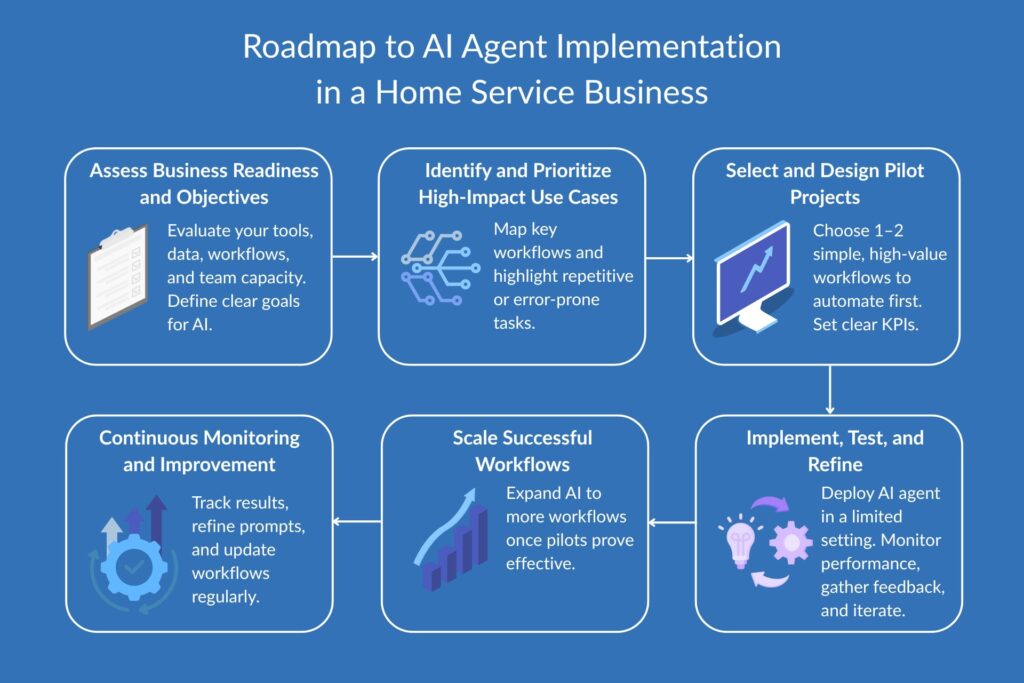
Rolling out AI agents isn’t something you do all at once. It’s a staged process that starts with identifying simple, high-impact workflows and expands as your business becomes more comfortable with the technology. Below is a clear roadmap that home service businesses can follow to implement AI agents successfully.
1. Assess Business Readiness and Objectives
Start by evaluating your current tools, data quality, internal processes, and team capacity. This step helps you understand how prepared you are for AI—and what your goals should be. Are you trying to reduce admin time, capture more leads, or improve customer service response times? Define those outcomes upfront
51d.co, auxiliobits.com
2. Identify and Prioritize High-Impact Use Cases
Map out your core workflows—calls, quotes, bookings, follow-ups—and flag tasks that are repetitive, time-consuming, or prone to errors. Evaluate them using a value-feasibility matrix to prioritize based on how easy they are to automate and how much business value they deliver
elementera.com
3. Select and Design Pilot Projects
Pick one or two simple but meaningful workflows to pilot, like booking appointments or answering FAQs. Define clear success metrics (time saved, customer satisfaction, reduced missed calls) and prepare your team for the test run
designersx.us
4. Implement, Test, and Refine
Launch your AI agent in a controlled environment. Monitor performance, gather customer and employee feedback, and make adjustments. A human-in-the-loop model during this stage helps ensure the agent aligns with your service standards
copy.ai
5. Scale Successful Workflows
Once your pilot proves effective, expand to more processes. This could include lead qualification, post-job review requests, or even dispatch management. Set up governance processes to ensure the AI behaves as intended and is regularly reviewed for accuracy and effectiveness
10minmba.com
6. Continuous Monitoring and Improvement
AI agents aren’t fire-and-forget tools. You’ll want to continuously monitor performance, update data and prompts, and adapt workflows as your business evolves. Don’t forget to invest in team training to support adoption
digital.orange-business.com
Summary of the roadmap:
| Step | Key Action |
| Assess Readiness | Evaluate tools, team, and data |
| Identify Use Cases | Map workflows and prioritize by impact |
| Design Pilots | Choose simple tasks and set success metrics |
| Implement and Test | Launch, monitor, and refine in a controlled setting |
| Scale What Works | Expand adoption to more workflows |
| Monitor and Improve Continuously | Adapt, optimize, and train staff for long-term success |
AI agent adoption isn’t just a tech upgrade—it’s a business transformation. Start small, learn fast, and build from there.
Data and Resources You Need to Evaluate Workflows for AI Adoption
Before launching any AI agent, it’s critical to evaluate whether a workflow is a good fit—and whether your business has the data and infrastructure to support it. Rushing into automation without the right foundations often leads to disappointing results. Here’s what you’ll need to make informed, successful decisions.
Business and Workflow Understanding
Start by documenting how your business operates today. This includes task sequences, roles, tools used, and pain points. Focus especially on identifying repetitive, time-consuming, or error-prone workflows—these are often ideal candidates for AI automation
orq.ai, gem-corp.tech
Data Resources
To automate a workflow, your AI agent needs access to relevant data—and that data needs to be clean and usable.
- Create a data inventory of all relevant inputs, including appointment logs, call transcripts, form submissions, and service records
- Assess data quality: look for gaps, inconsistencies, duplicates, and outdated records
- Prepare data formats so that your tools can access and use the information easily
- Ensure data security and compliance, especially if you store personal or payment information
digitalrealty.com, martech.org
Technical and Human Resources
You’ll also need tools and expertise to support the build and deployment of AI agents.
- AI tools or platforms that align with your business systems
- Integration options like APIs or connectors that link your agent to your CRM or booking software
- Personnel or partners with skills in automation, data analysis, or AI modeling—or access to vendors who offer these as managed services
- Buy-in from stakeholders across leadership, operations, and frontline roles to ensure alignment and adoption
copy.ai, getguru.com
Evaluation and Planning Resources
Decide in advance how you’ll judge success and determine whether to scale a workflow.
- Use frameworks like the Value–Feasibility Matrix to score workflows
- Define KPIs such as reduction in admin time, increase in lead conversion, or improved customer response times
- Create a change management plan to support rollout, including staff communication and training
elementera.com, itsdart.com
Pilot and Testing Infrastructure
Test before you commit. Create a sandbox environment where you can validate how the AI performs and gather feedback from real users.
- Use a testing environment that mimics live operations
- Monitor results, analyze errors, and adjust the workflow based on performance and staff input
orq.ai, getguru.com
Summary of what you’ll need:
| Resource or Data Type | Role in Evaluation and Implementation |
| Business process documentation | Identify automation opportunities |
| Data inventory and quality check | Ensure AI has usable inputs |
| AI tools and platforms | Execute workflows and integrate with your systems |
| API or middleware integrations | Enable communication between tools |
| Skilled personnel or vendors | Guide analysis, design, and implementation |
| Stakeholder buy-in | Align priorities and drive adoption |
| Evaluation frameworks | Rank and prioritize candidate workflows |
| KPIs and tracking tools | Measure ROI and make data-driven decisions |
| Sandbox/testing environment | Test agents before full deployment |
| Feedback and monitoring tools | Support ongoing improvement and quality control |
Having these assets in place dramatically increases your chances of launching AI agents that actually deliver value—not just buzzwords.
Cost and ROI Considerations
One of the biggest questions home service business owners ask is whether AI agents are worth the investment. The good news is that when deployed strategically, AI agents can pay for themselves quickly—by saving time, capturing more leads, and allowing teams to focus on high-value work.
Upfront and Ongoing Costs
The cost of implementing AI agents varies depending on the platform and level of customization. Most agent platforms charge a monthly fee, typically ranging from $200 to $1,500 per location, depending on features, usage volume, and integrations. Some also charge setup or onboarding fees for training the agent on your scripts, FAQs, and workflows
serviceagent.ai, retellai.com
If you’re building a custom solution using tools like OpenAI, Voiceflow, or Relay.app—with n8n running backend automations—you may also need to factor in developer costs, API usage fees, and time spent managing the system.
Return on Investment (ROI)
AI agents drive ROI in several key ways:
- Lead capture: Answering after-hours calls or handling multiple leads simultaneously increases conversion without additional staff
- Admin time savings: Automating appointment scheduling, call summaries, and follow-ups reduces manual work
- Customer satisfaction: Faster responses and fewer dropped calls improve NPS scores and reduce churn
- Scalability: You can grow your lead volume or service area without increasing overhead
nexa.com, xapp.ai
Break-Even Timeline
For many home service companies, the breakeven point can be as fast as 1–2 months if the agent helps land even one or two additional jobs per week. In high-value verticals like HVAC, plumbing, and roofing, a single booked job can easily cover the monthly cost of the platform.
When AI Becomes a Growth Lever
Beyond cost reduction, AI agents become strategic when they help you grow. If your calendar is maxed out, AI agents help prevent dropped leads. If your team is overstretched, they relieve pressure without requiring new hires. Over time, this improves your margins, consistency, and customer experience.
Where AI Agents Fit in the AI Adoption Journey
AI agents are powerful—but they aren’t the starting point. They represent a more advanced level of adoption, typically implemented after a business has already started using tools like ChatGPT, prompt libraries, and automation platforms like Make or Zapier. That’s why we categorize AI agents as Level 5 in our six-stage AI adoption framework for home service businesses.
Here’s a quick recap of the levels:
- Prompting with the right tool
Basic use of tools like ChatGPT to speed up tasks (emails, captions, website copy) - Prompt libraries
Reusable, tested prompts built for your industry and use cases - Custom GPTs
Personalized AI tools trained on your business processes, FAQs, and voice - Workflow automation
Tools like Make, Zapier, and n8n automate tasks between platforms - AI agents
Agents reason, plan, and take actions independently using your systems - Own AI systems
Fully customized AI models built in-house for proprietary operations
For most home service businesses, Levels 1–3 offer a fast and affordable way to get started. But once you’ve stabilized your processes and have clear workflows in place, Level 5 is where you start to see transformational gains in efficiency and scalability.
You can read more about the full framework in our guide to AI for Home Service Businesses.
Conclusion
AI agents are no longer just for tech giants—they’re a practical tool that home service businesses can use right now to improve lead response, automate bookings, streamline support, and scale operations without growing headcount. By taking over repetitive, time-sensitive tasks, AI agents free up your team to focus on delivering excellent service.
If you’re just starting out with AI, focus first on simple wins like 24/7 call answering or appointment scheduling. From there, you can integrate your agent with your CRM, expand into multi-step workflows, and eventually build a scalable, intelligent backend using tools like n8n.
The opportunity is clear: businesses that adopt AI agents early will move faster, convert more leads, and operate more efficiently than competitors who stick to manual processes. The question isn’t whether AI agents will become common in home services—it’s whether you’ll be ahead of the curve or playing catch-up.
If you’re ready to explore how AI agents can work for your business, get in touch or check out our AI adoption services for home service companies. We’ll help you start smart, scale fast, and build systems that grow with you.