AI & Automation
8 Custom GPTs Every Home Service Business Should Be Using in 2025
If you own a plumbing, HVAC, pest control, or electrical business, you don’t need another “AI is the future” pep talk.
You need something that saves time right now — like handling FAQs so your phone stops ringing off the hook, or training new hires without repeating yourself 20 times.
That’s where Custom GPTs come in.
These aren’t generic chatbots. They’re intelligent assistants you can build in minutes, loaded with your tone, your SOPs, and your know-how — all without writing a single line of code.
In this guide, we’ll break down:
- What Custom GPTs actually are (and why they matter),
- How to build one fast — no tools, no fluff,
- And 8 proven GPTs your business can start using today.
What Is a Custom GPT? (And Why You Should Care)
Custom GPTs are AI-powered assistants you can train to think and speak like your business.
Instead of giving generic answers, they follow your instructions, use your documents, and respond in your brand’s tone of voice. Think of them like a digital team member who:
- Knows your services inside-out,
- Never forgets your pricing or process,
- And works 24/7 without getting tired or asking for a raise.
And the best part?
You don’t need to know code. All it takes is a ChatGPT Plus subscription, a few clear instructions, and some business documents like FAQs, SOPs, or price sheets.
This level of capability sits at Level 3 in the AI adoption pyramid:
- Prompting with the right tool
- Prompt libraries
- Custom GPTs ← you are here
- Automation (Zapier, Make, etc.)
- Agents
- Build your own AI
Custom GPTs are the perfect balance of power and simplicity — advanced enough to handle real work, simple enough to set up this afternoon.
How to Build a Custom GPT (No Coding Required)
Setting up a Custom GPT is easier than you think. If you can upload a PDF and write a clear instruction, you can build one today.
Here’s the simple 5-step process:
Step 1: Choose One Clear Use Case
Start narrow. Don’t try to make a GPT that does everything.
Pick a specific job it should handle — like answering customer questions, helping with sales objections, or training a new hire. The more focused it is, the more useful it will be.
Example use cases:
- “Answer basic service and pricing FAQs”
- “Explain our estimate process in simple terms”
- “Reply to Google reviews using a professional tone”
Step 2: Go to the GPT Builder
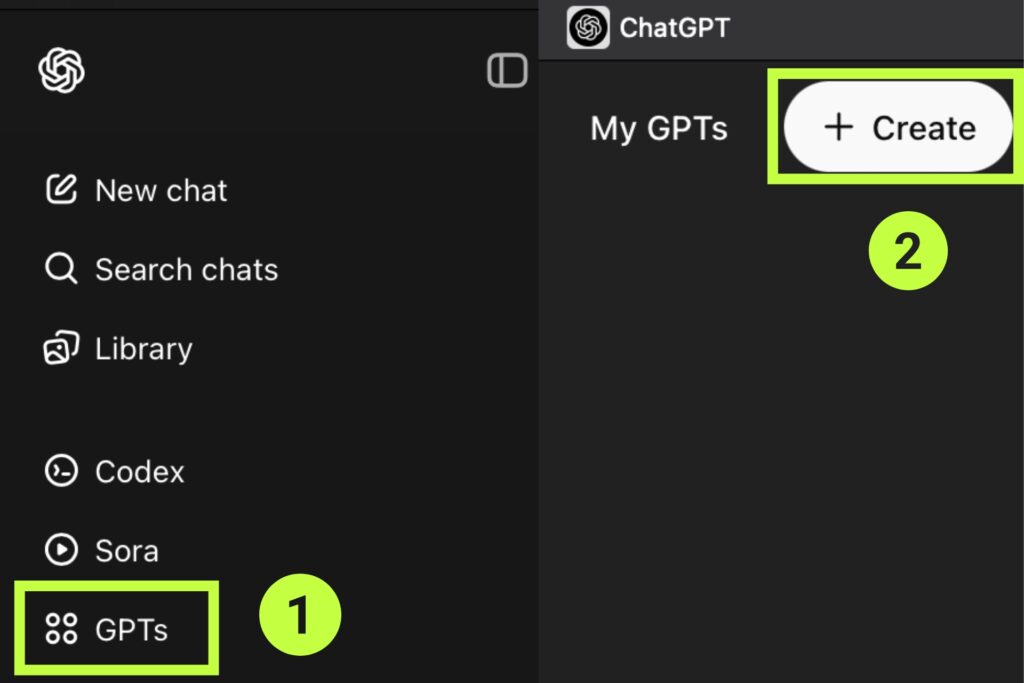
You’ll need a ChatGPT Plus or Enterprise account.
- Log into chat.openai.com
- Click Explore GPTs
- Hit Create
- Choose Walkthrough or Configure manually (we recommend manual)
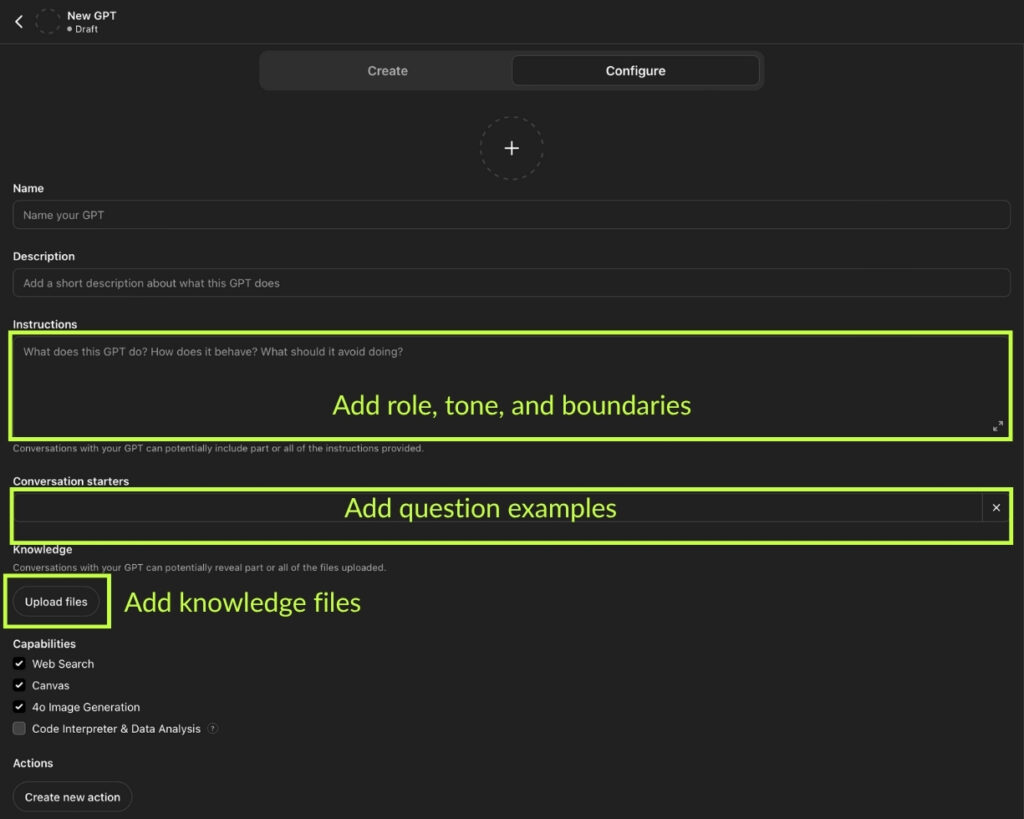
Step 3: Fill In the Configuration
There are two main things to focus on here:
Instructions Tab
Tell the GPT how to behave. Include:
- Role: What it is (“You are a friendly HVAC office assistant”)
- Tone: Formal, casual, direct, witty — pick one
- Boundaries: What it should never do (e.g. give pricing without context)
- Examples: Add sample questions + ideal answers
Knowledge Files
Upload up to 20 files — PDFs, TXT, or DOCX. Examples:
- Service area list
- SOPs
- FAQ sheets
- Pricing breakdowns
- Company policies
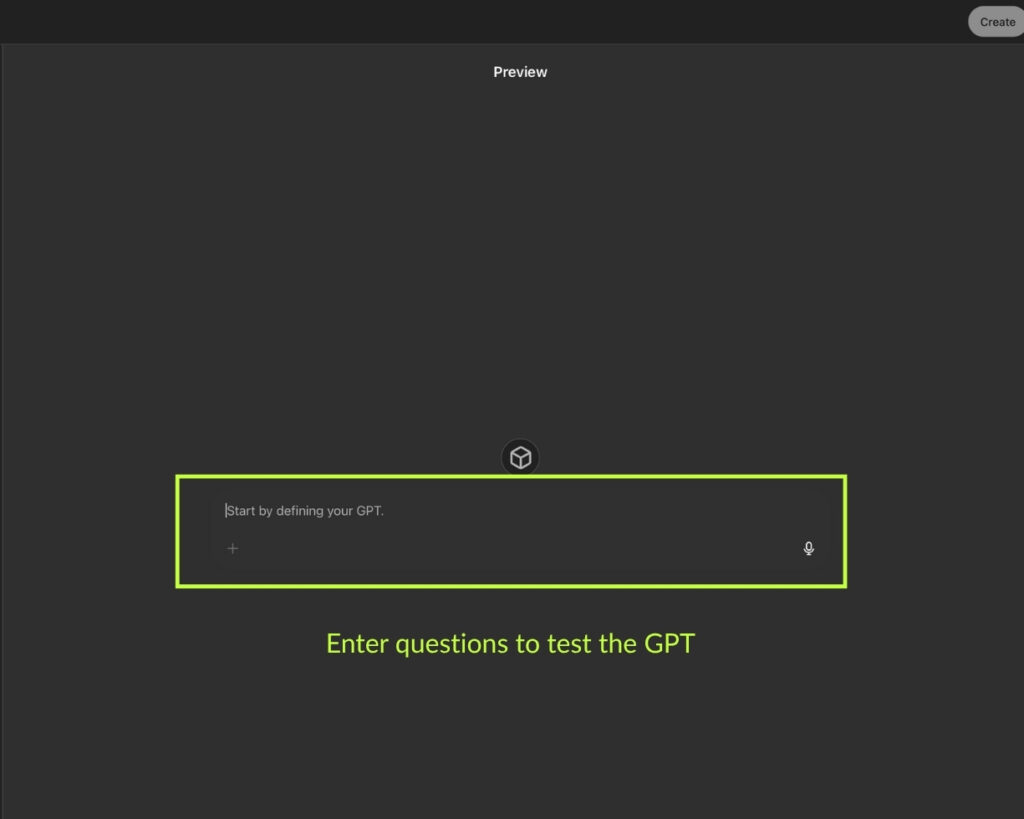
Step 4: Test It in Preview Mode
Once your GPT is configured, try asking it real questions:
- “How much does a ductless system cost?”
- “What should I do before the technician arrives?”
- “Why is this estimate more than I expected?”
Tweak the responses by adjusting your instructions or adding missing info to the knowledge base.
Step 5: Share It
When it’s ready:
- Use it privately via a link (great for internal team use)
- Or publish it publicly in the GPT Store to showcase your brand
Pro Tip:
Don’t aim for perfection. Just get it live, then update it over time based on real usage.
8 High-Impact Custom GPTs (Level 3-Only Use Cases)
These aren’t hypothetical. These are real, practical GPTs you can build right now — no integrations, no automations, just pure value from within ChatGPT.
Each one solves a specific problem faced by home service businesses. And because they’re all Level 3 in the AI adoption pyramid, they require no third-party tools or technical setup beyond what ChatGPT offers.
1. SOP Assistant
Turn your existing documentation into an always-on trainer.
Upload your step-by-step processes (install guides, inspection checklists, etc.) and let the GPT answer technician questions like:
“What’s the procedure for flushing a tankless water heater?”
2. Customer Q&A Bot
Stop answering the same 10 questions every day.
Train your GPT to respond to questions like:
“Do you service [city]?”
“How much is an AC tune-up?”
“How soon can you come out?”
3. Sales Objection Coach
Equip yourself (or your team) with strong, professional responses to common objections.
Upload sample dialogues or your sales script, and ask things like:
“What should I say if they say we’re too expensive?”
“How do I handle ‘I need to think about it’?”
4. Review Responder
Automate professional, on-brand responses to your online reviews.
Paste in the review, and your GPT replies with empathy and polish — without over-apologizing or sounding robotic.
“Respond to a 2-star review about a missed appointment — stay polite but stand your ground.”
5. Estimate Explainer
Take the confusion out of pricing by uploading a breakdown of your estimate structure.
Your GPT can explain what’s included in a $4,500 HVAC quote, why labor costs what it does, and how rebates apply.
6. Team Onboarding Guide
Upload your employee handbook, safety protocols, and day-one instructions.
Now you’ve got a self-serve onboarding assistant that answers:
“What tool do I need for crawlspace jobs?”
“Where do I clock in on Monday?”
7. Blog Content Buddy
Turn your knowledge into SEO content — without writing from scratch.
Feed your GPT project notes, old job descriptions, or FAQ sheets. Then ask:
“Give me an outline for a blog post about heat pump vs. furnace”
“Write an FAQ section about pest inspection preparation”
8. Internal Knowledge Base
Centralize all your how-tos, vendor details, and admin info in one searchable AI.
Staff can ask:
“Where do I find the MSDS sheet for our pesticide?”
“Who handles warranty claims?”
“What’s the process for refunding a client?”
Reminder:
These are Level 3 GPTs — fully usable inside ChatGPT. No CRM connections, no Zapier workflows, no external automations.
We’ll cover advanced Level 4 integrations in a future article.
Real-World Examples
You don’t need a giant tech team or a Silicon Valley budget to make Custom GPTs work. These examples are from small service businesses just like yours — using Level 3 GPTs to save time, reduce friction, and stay consistent.
Example 1: HVAC Company Slashed Admin Time by 30%
A 5-person HVAC team in Manchester trained a GPT to handle common customer questions:
- “Do you service my area?”
- “How soon can you come out?”
- “What does a tune-up include?”
Result: fewer interruptions for techs, faster responses for clients, and a noticeable drop in admin hours.
Example 2: Landscaper Onboards New Hires Without Lifting a Finger
Instead of repeating the same training every spring, a landscape business in Oregon built a GPT with:
- Job site checklist uploads
- Safety protocol PDFs
- Day-one expectations
New hires ask questions like:
“What do I wear on irrigation days?”
“What’s our policy on damaged property?”
Now onboarding runs on autopilot.
Example 3: Pest Control Owner Writes Weekly Blogs With AI Help
A solo operator in Texas uploaded his inspection process and service FAQs to a GPT. Every week, he prompts:
“Write a 500-word blog post: ‘How to Tell if You Have a Termite Problem’”
“Give me 3 FAQs for our rodent control page”
No fluff, no writer’s block — just fast, usable content that helps him rank locally.
The takeaway?
You don’t need to be tech-savvy. You just need clear documents, a little direction, and the will to save yourself a few hours (or headaches) every week.
Prompt Templates You Can Use Today
You don’t need to start from scratch when configuring your GPT. Below are plug-and-play prompt templates you can use to train your Custom GPTs or test output quality before sharing with your team.
These are designed for Level 3 GPTs — based on internal knowledge and clear instructions only.
SOP Assistant
“Explain how to perform a standard water heater flush to a junior technician. Keep it clear and step-by-step.”
Customer Q&A Bot
“What’s included in your $149 AC tune-up? Do you offer any warranties?”
(Make sure it pulls from your uploaded service list or pricing guide.)
Sales Objection Coach
“A customer says ‘We’re going to go with someone cheaper.’ How should I respond to reframe the value?”
Review Responder
“Respond to a 2-star Google review from a customer who said we were late and unprofessional. Stay polite, acknowledge the feedback, and defend the team.”
Estimate Explainer
“Break down what’s included in a $3,800 quote for a mini-split installation. Use plain English.”
Team Onboarding Guide
“It’s my first day. Where do I find the weekly schedule, and what uniform should I wear?”
(Make sure your handbook or new hire guide is uploaded.)
Blog Content Buddy
“Write an outline for a blog post titled ‘5 Signs You Need Drain Cleaning Service’”
“Generate 3 FAQ questions and answers for a service page about termite inspections.”
Internal Knowledge Base
“Who handles customer refunds, and how do I log the reason in our CRM?”
(Works great when you’ve uploaded SOPs and admin docs.)
Pro Tip:
Use these in the GPT’s “Instructions” tab as example interactions. The more real-world your examples, the better the GPT will perform.
When Not to Use a Custom GPT
Custom GPTs are powerful — but they’re not magic. And they’re definitely not a replacement for human judgment in sensitive situations.
Knowing where to draw the line is what separates smart operators from careless ones.
Here’s where you should not rely on a GPT:
Legal or Financial Advice
Don’t let your GPT answer questions like:
“Can I sue my landlord for mold?”
“How much should I write off for tools?”
It might sound confident — but it’s not a lawyer or an accountant. And it doesn’t know your local laws.
Crisis or Complaint Handling
Angry customers want empathy, not AI.
A GPT can help draft a polite reply, but if someone’s furious about a flooded basement or damaged property, step in yourself.
Use GPTs for:
✅ Drafting a first response
Avoid for:
❌ Full back-and-forth conversations with upset clients
Safety-Critical Instructions Without Oversight
Even if your SOPs are clear, don’t fully outsource high-risk tasks like:
- Gas line installations
- Chemical handling
- Structural repairs
Let the GPT support training — not replace supervision.
Sensitive Employee Situations
Coaching someone on performance? Firing someone? Addressing a workplace issue?
Don’t leave it to AI. It’s not equipped to read the room or handle nuance.
The Bottom Line:
Let GPTs handle repetitive tasks.
Let humans handle responsibility.
The smarter your boundaries, the more your team will trust — and use — the tools you give them.
Custom GPTs vs Other AI Tools
Not all AI is created equal — and not all tools are meant for the same job.
If you’re a business owner trying to figure out whether you need a chatbot, an automation tool, or a Custom GPT, this chart will help you make sense of it.
Here’s how Custom GPTs (Level 3) compare to other AI solutions:
| Tool Type | Best For | Skill Level | Requires Integrations? |
| Prompting (Level 1) | One-off tasks, brainstorming, general info | Low | ❌ |
| Prompt Libraries (Level 2) | Repeatable tasks, team-wide consistency | Low–Medium | ❌ |
| Custom GPTs (Level 3) | Branded assistants, internal help, content, sales tools | Medium | ❌ |
| Automation Tools (Level 4) | CRM workflows, scheduling, job status updates | Medium–High | ✅ (Zapier, Make, etc.) |
| AI Agents (Level 5) | Autonomous goal-driven AI (e.g. Auto-GPT, AgentOps) | High | ✅ |
| Build Your Own AI (Level 6) | Fully custom applications and ML models | Expert | ✅ |
Why Custom GPTs Hit the Sweet Spot:
✅ Smart enough to solve real business problems
✅ Easy enough for non-technical users
✅ Fast to build, easy to maintain
✅ No risky automation or API setup required
They’re the perfect balance between usefulness and simplicity — which is why Level 3 is where most service businesses should start.
Final Tips for Success
You don’t need to be technical, brilliant, or even particularly patient to get value from Custom GPTs.
But you do need to approach them like a business owner — not a hobbyist.
Here’s how to make your GPTs actually useful (and not something you forget about after a week):
1. Start With One Problem
Don’t try to build an all-in-one mega bot.
Pick one real-world pain point — like answering repetitive customer questions or training new hires — and build a GPT that solves just that.
2. Write Instructions Like You’re Talking to a New Hire
Be clear. Be specific. Tell the GPT:
- Who it is
- Who it helps
- What tone to use
- What not to say
If your instructions are vague, the output will be too.
3. Upload Real Business Docs
The magic of a Custom GPT isn’t in the AI — it’s in the materials you give it.
Upload your actual:
- SOPs
- Service lists
- Pricing guides
- Employee onboarding docs
- FAQ sheets
This is what gives your GPT real-world context and credibility.
4. Test It Monthly
Use Preview Mode to simulate real questions your staff or customers ask.
If it struggles, tweak the instructions or upload new material. Iteration > perfection.
5. Roll It Out Intentionally
If it’s for your team, show them how to use it. Add a bookmark. Make it part of the SOP.
If it’s for your customers, link it on your website or include it in follow-up emails.
Don’t just build it — integrate it into your workflow.
The Bottom Line:
A well-built GPT doesn’t just save you time.
It builds trust, keeps your team aligned, and gives your business an edge.
AI That Actually Helps — Not Hype
You don’t need to be on the bleeding edge of AI to get results.
You just need to solve one annoying problem in your business — better, faster, and more consistently than before.
That’s what Custom GPTs do.
They don’t replace people. They don’t run your company. But they do take repetitive tasks off your plate, help your team stay sharp, and make you look more professional without spending a dime on new hires or developers.
And the best part? You can build your first one today.
Want Help?
If you’re too busy to figure it out, we’ll build your GPT for you.
Let Negosense set it up: book a free strategy call.